How We Connected Drupal Commerce to Basware with PunchOut

Aug 17, 2026

The real job was not connecting two systems. It was making them feel like one buying journey.

Connect procurement to the buying experience — without rebuilding the catalog.

Most Drupal Commerce projects end at checkout. This one had to end in Basware.

We built this integration for Factory.yllw.com, a Nordic B2B furniture marketplace with regional content, configurable products, customer-specific access, wishlists, and project lists. Many buyers, however, had to complete purchases inside their company’s procurement platform.

The goal was straightforward: enter the marketplace from Basware, select products in the familiar catalog, and return the cart for approval. That required authentication, company context, private session data, regional routing, and an OCI payload the receiving platform could process.

We built a custom Drupal Commerce PunchOut integration around the marketplace that was already there.

In short:

  • Basware starts an authenticated buying session in Drupal;
  • the buyer keeps using the existing wishlist or project-list workflow;
  • Drupal maps the selection to OCI and returns it to the company’s procurement process.
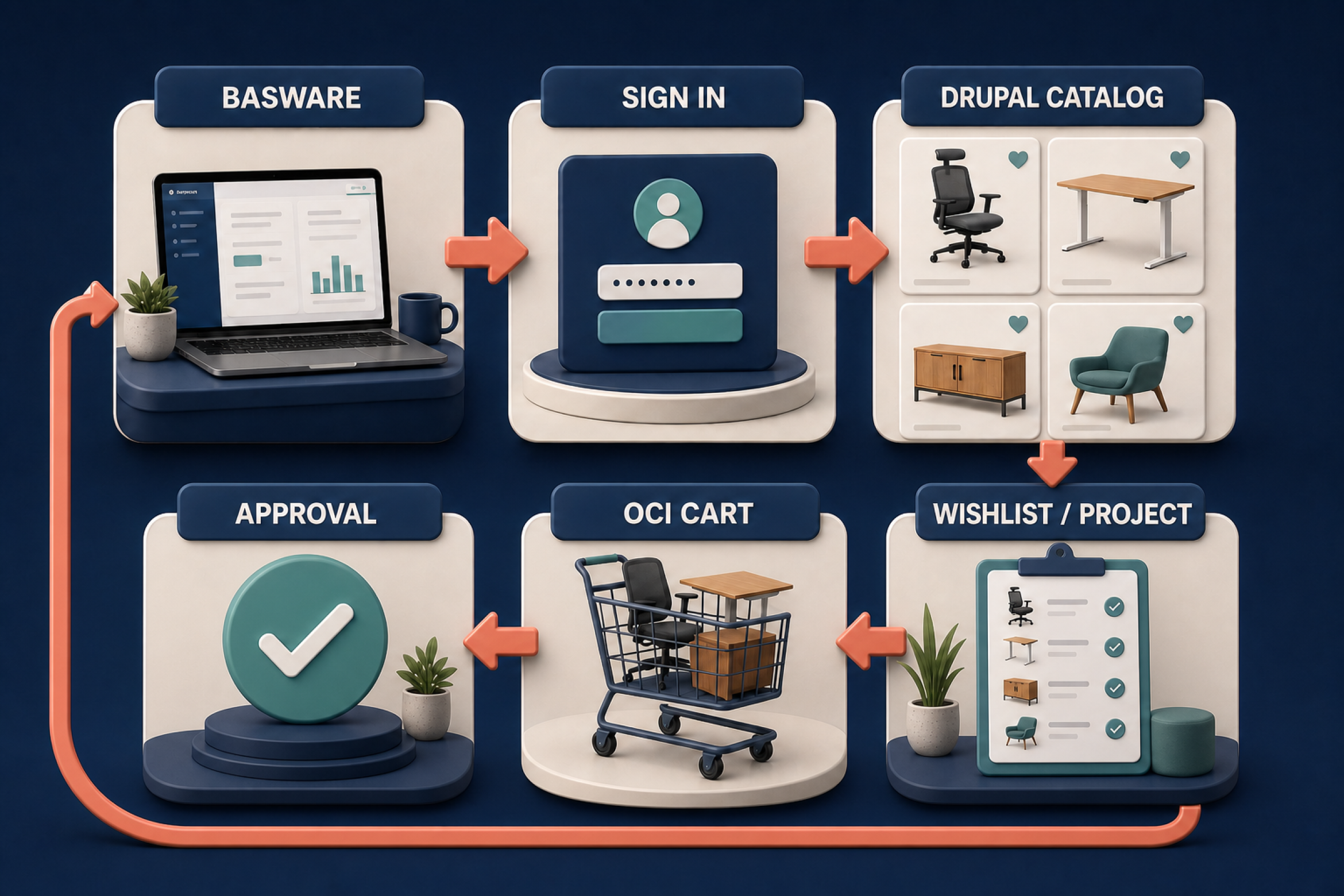
Drupal Commerce PunchOut flow from Basware sign-in to OCI cart approval

How the Drupal Commerce PunchOut Integration Works

We built the integration as a round trip:

Basware → Drupal authentication → private PunchOut session → wishlist or project list → OCI mapper → Basware approval

1. Basware starts the session

Basware sends the buyer to a dedicated endpoint in Drupal. The request carries the credentials needed for authentication and a return address, provided as HOOK_URL. That URL is where the completed selection must go.

2. Drupal authenticates the buyer

Drupal validates the credentials against a dedicated account and checks the PunchOut permission. A valid login is not enough: the account must be explicitly allowed to use the integration.

The account is linked to a company profile, so the procurement identifier and the buyer’s organization stay connected to the session.

3. The PunchOut context is stored privately

Drupal creates temporary storage for the current buyer. It keeps the Basware return URL and procurement context available while the buyer moves through the catalog. The data is never shared with another user session.

4. The buyer uses the existing catalog

The catalog behaves as it normally does. The only PunchOut-specific addition is a “Transfer Cart to Procurement System” action, shown while the session is active. Regular marketplace customers do not see it.

5. Drupal prepares the cart

Before loading products, Drupal checks the active session again. A wishlist is loaded for the current user. A project list receives an additional ownership check, so changing an identifier in the request cannot expose another buyer’s data.

The mapper then converts Commerce values to the OCI contract:

Drupal Commerce valueOCI field
Product descriptionNEW_ITEM-DESCRIPTION[n]
QuantityNEW_ITEM-QUANTITY[n]
UnitNEW_ITEM-UNIT[n]
Unit priceNEW_ITEM-PRICE[n]
Supplier SKUNEW_ITEM-VENDORMAT[n]
CurrencyNEW_ITEM-CURRENCY[n]

Prices use the required decimal format, quantities follow one consistent representation, and every item receives its own line index.

6. The cart returns to Basware

The browser submits a hidden OCI form to the stored return URL. Once the transfer starts, Drupal closes the PunchOut session. The buyer lands back in Basware, where the company’s existing approval process continues.

The Business Problem: One Catalog, Two Buying Systems

Product discovery happened in the supplier’s marketplace, while approval and ordering happened in Basware. Without PunchOut, someone would have to copy the SKU, quantity, price, and currency between systems and hope they still matched.

PunchOut lets the buyer open the live supplier catalog from the procurement platform and return a prepared selection instead of placing a standard e-commerce order.

Inside the marketplace, the buyer can still:

  • browse and compare products;
  • choose product variations and configurable options;
  • prepare a quick wishlist;
  • build a structured project list for a larger job;
  • adjust quantities before returning the cart.

Drupal Commerce owns the catalog experience. Basware owns approval and procurement. The integration joins them without asking the buyer to manage the boundary.

Building Drupal Commerce around real business workflows.

We Did Not Build a Second Cart

The marketplace already had two useful selection models. A wishlist worked for a straightforward order, while a project list handled larger furniture projects grouped by room or project area. We explain that project workflow in more detail in our B2B furniture project workflow case study.

A separate PunchOut cart would have duplicated that logic and introduced another interface. Instead, we made PunchOut aware of both existing tools.

The integration had to:

  • authenticate a buyer arriving from Basware;
  • connect the account to the correct company profile;
  • keep the PunchOut context active during catalog navigation;
  • support both wishlists and project lists;
  • extract product data from Drupal Commerce;
  • map the selection to OCI fields;
  • return the cart to the procurement platform.

The marketplace serves several regions, so the entry flow also opens the appropriate language version of the catalog when a regional mapping exists. Otherwise, Drupal uses the configured landing page.

Why We Used a Custom Integration

Drupal already has Commerce OCI Checkout for conventional Commerce cart scenarios. This marketplace did not transfer a standard cart: buyers selected products through wishlists or project lists, and the flow also had to preserve company context, regional routing, and ownership rules.

A project-specific layer let us reuse those selection tools while isolating the Basware authentication, PunchOut session, and OCI return. We were not rebuilding the catalog around PunchOut; we were adapting PunchOut to an established buying journey.

The Challenge We Did Not See on Paper

This was the part of the project that looked settled until we tested the complete round trip.

Our first transfer layer was built around PEPPOL PunchOut and a T77 catalog document in UBL XML. On paper, it was a structured way to carry supplier, buyer, and product data.

The real Basware endpoint expected something different: an OCI-compatible HTML form submission, not a Base64-encoded T77 document.

That changed the transfer layer, but it did not force us to rebuild the integration. Drupal Commerce still supplied the same descriptions, SKUs, quantities, prices, and currencies. We kept the product extraction and replaced the final mapper.

It was a useful reminder for us: protocol names are not enough. Before treating an integration contract as final, test the actual request, the actual return mechanism, and the way the receiving platform reads every field. Basware’s external webshop documentation is a good starting point, but the end-to-end test is what closes the question.

Keeping the Drupal Architecture Flexible

Changing the protocol should not mean rewriting the buying journey. We designed the custom module around that rule.

The implementation has three clear responsibilities:

  • The controller handles the incoming PunchOut request, authentication, authorization, and transfer endpoint.
  • The session service keeps the temporary PunchOut state private to the current buyer.
  • The cart builder and mapper extract Commerce data and translate it to the external format.

That separation paid for itself when we moved from the earlier XML approach to OCI. Product selection, company mapping, regional routing, and access control stayed in place. Only the payload generation changed.

We also kept using the platform structures that were already doing their job: Drupal accounts, permissions, company profiles, Commerce variations, wishlists, and project lists. There was no reason to create duplicate data models just because another system had joined the workflow.

This is the same approach we use in custom Drupal development: keep business rules in clear services and isolate the part that belongs to a specific external platform.

Access Control Is Part of the Integration

A hidden button is not access control. That became an important rule in this implementation.

The visible cart-transfer action is useful for the interface, but Drupal checks the important conditions again on the server:

  • the PunchOut session must still be active;
  • the account must have permission to use it;
  • the account must belong to an unambiguous company profile;
  • a wishlist must belong to the current user;
  • a project list must pass an ownership check before its products are loaded;
  • the stored return URL and procurement context must remain private to that buyer.

The same care applies to the data itself. Decimal separators, units, line indexes, supplier identifiers, and currencies have to match the OCI contract exactly. A payload can be technically submitted and still be unusable if one of those details is interpreted incorrectly on the other side.

What Changed for the Marketplace

The finished integration connects the live Drupal Commerce catalog to Basware without replacing the marketplace’s existing product-selection tools.

Buyers can now:

  • enter the marketplace through an authenticated Basware session;
  • open the correct regional catalog;
  • prepare products in a wishlist or a structured project list;
  • transfer descriptions, SKUs, quantities, prices, units, and currencies in OCI format;
  • return to the company’s established approval process.

For the marketplace team, the architecture is reusable. Catalog extraction stays in Drupal Commerce, while another procurement platform can receive its own mapper and return mechanism.

For buyers, the benefit is simpler: they use the catalog that has the right product information and return to the system where their company already manages purchasing.

What We Would Repeat on the Next Project

These are the decisions we would make again.

  1. Start with the receiving platform. Confirm its authentication parameters, return mechanism, item fields, and validation rules before choosing the transfer format.
  2. Separate catalog extraction from payload generation. Product data should not be coupled to OCI, PEPPOL, cXML, or one procurement platform.
  3. Reuse the buyer experience that already works. PunchOut does not need another cart when wishlists or project lists already capture the selection.
  4. Check access at the point of transfer. Never rely on interface visibility to protect user-specific data.
  5. Test the complete round trip. A valid payload matters only when the receiving platform interprets every field correctly.

Frequently Asked Questions

What is PunchOut in B2B e-commerce?

PunchOut lets a buyer open a supplier’s e-commerce catalog from a procurement platform, prepare a cart with live product data, and return that cart for approval and ordering.

Can Drupal Commerce work as a PunchOut catalog?

Yes. Drupal Commerce can provide the catalog, product variations, prices, and selection workflow while a custom integration handles authentication, session context, data mapping, and the cart return.

Does Basware use OCI or cXML?

The expected format depends on the Basware setup and the external webshop contract. In this project, the receiving endpoint required an OCI-compatible form submission. We recommend verifying the actual endpoint before building the transfer layer.

What data returns to the procurement platform?

In our implementation, every line includes a description, quantity, unit, price, supplier SKU, and currency. The receiving platform may require additional fields for another catalog or organization.

Does PunchOut replace Drupal Commerce checkout?

No. The regular checkout remains available for standard customers. During a PunchOut session, the buyer uses a separate transfer action and completes approval in the procurement platform.

Connecting Commerce and Procurement

PunchOut works well when it connects two established systems without forcing either one to become something it is not.

Drupal Commerce remains the place where buyers explore products and prepare a selection. Basware remains the place where the organization reviews and completes the purchase. The integration connects them with authentication, company context, access control, and an OCI cart transfer.

If your company already has a Drupal catalog and needs to connect it to Basware or another procurement platform, the best starting point is the buying process you already have. We can help with Drupal e-commerce development, integration architecture, and the custom workflow between both systems.

Tell us where your buyers start and where the cart needs to return.

zanzarra logo
Enjoying the article?

Consider subscribing to our social media.

We much appreciate it.